
What is Salesforce RTO and RPO? Everything You Need to Know About Data Recovery Planning
Updated October 2026
Recovery Time Objective (RTO) and Recovery Point Objective (RPO) are two important metrics that businesses must consider when developing Salesforce data recovery plans. A reliable data recovery plan is crucial for businesses of all sizes, and especially for enterprises running on Salesforce.
Your Salesforce RTO and RPO goals should be regularly reviewed and updated based on your enterprise’s specific needs and requirements, as well as the requirements of regulators - backup and restore is mandated by a growing number of regulations (DORA, NIS 2, CPS 230, etc.). And those regulations not only require backups, but also proven and auditable test results proving that recovery is possible - or the non-compliant organization faces steep fines.
Below is a beginner's guide to Salesforce RTO and RPO. If you'd like a deeper dive, we encourage you to get "RTO & RPO for Salesforce Data Recovery Plans: 5 Things to Know" now.
What is RTO for Salesforce data?
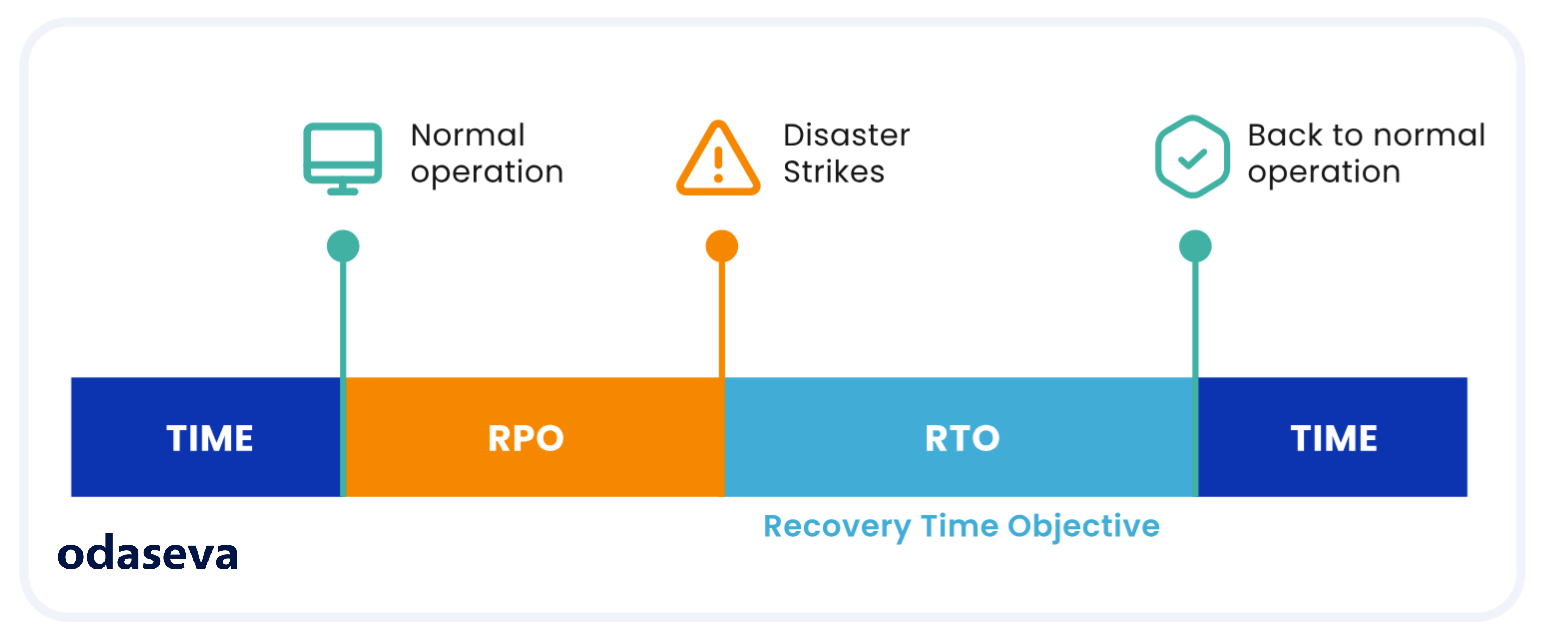
Recovery Time Objective, also known as RTO, is the duration of downtime that a business can tolerate before its operations are affected. It is the maximum amount of time a business has for its systems and applications to be fully functional after a disaster.
For example, if a business has a two-hour RTO, it means that within two hours of the disruptive event, the affected resource(s) must be fully operational and ready to support the organization's objectives.
Why does RTO matter in Salesforce data recovery planning?
Setting an RTO goal is an essential part of data recovery planning as it helps businesses plan the recovery process and set expectations for employees and customers.
What is RPO for Salesforce data?
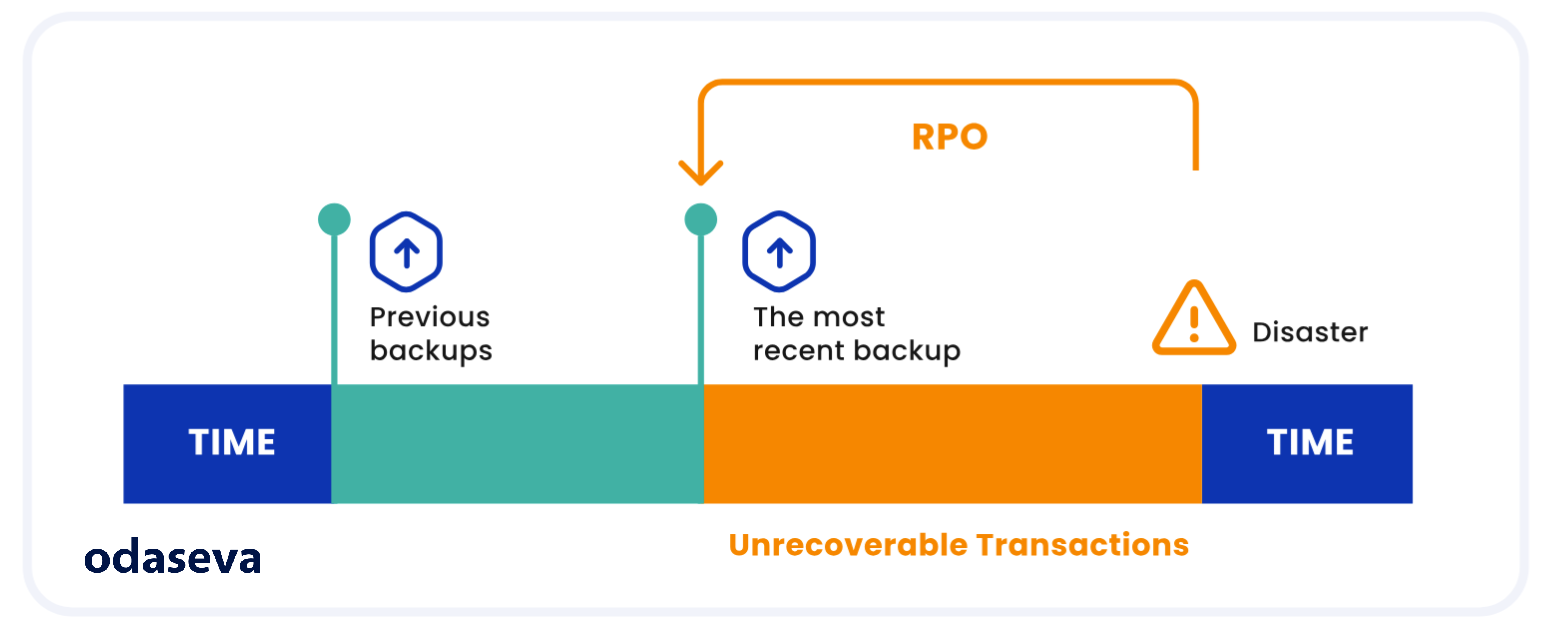
Recovery Point Objective, also known as RPO, is the maximum amount of data loss that a business can tolerate after a disaster. RPO determines the frequency of backups that need to be taken to ensure minimal data loss.
For example, if a business has an RPO of two hours, it means that backups need to be taken every two hours to ensure that the data is up-to-date in case of a disaster.
Why does RPO matter in Salesforce data recovery planning?
Setting an RPO goal is an essential part of data recovery planning as it helps businesses determine how frequently they need to backup data and metadata to minimize the risk of data loss.
What are the key RTO and RPO considerations for Salesforce data recovery?
When it comes to protecting Salesforce data, there are specific RTO and RPO considerations that enterprises should keep in mind:
- Understand the criticality of Salesforce data: Enterprises need to understand the criticality of Salesforce data and determine the impact of data loss or downtime. This will help define the RTO and RPO for Salesforce data.
- Identify Salesforce data dependencies: Identify the dependencies of Salesforce data with other systems, applications, and processes. This will help enterprises design an effective backup and recovery strategy for Salesforce data.
- Choose the right backup and recovery solution: While choosing a backup and recovery solution that meets RTO and RPO requirements, consider factors like:
- Backup frequency (weekly, daily, hourly, or up to every 5 minutes)
- AI-readiness and trust (support for zero-copy architecture, automated AI anomaly detection, etc)
- Data agility and open data (vendor lock-in protection, automated downstream integration, etc)
- Customization options (governor limit mitigation, flexible scheduling, on-demand capabilities, etc.)
- Expertise (implementation services, ongoing managed services, etc)
- Cost and infrastructure (hidden costs for services like initialization and development, license bundling, etc)
- Backup location
- Backup retention policy
Note: for more information about selecting the right Salesforce backup vendor for your needs, get “The 2026 Enterprise Guide: Navigating Salesforce Data Resilience” here.
- Test backups regularly: Test backups regularly to ensure that they can recover Salesforce data within the defined RTO and RPO parameters. This also helps identify any issues with the backup process and ensures that backups are reliable.
- Consider data encryption: Encrypting Salesforce data ensures that it remains secure, even if it falls into the wrong hands. End-to-end encryption further extends the security of backups.
- Train employees on data protection: Training employees on data protection best practices, including how to handle Salesforce data, reduces the risk of accidental data loss or theft.
- Factor in scalability: RPO is not only determined by backup frequency, but also by Salesforce resource usage constraints and the ability to manage Large Data Volumes (LDV). A backup can take hours, or even fail, when it uses the incorrect API or exceeds Salesforce governor limits.
Salesforce provides data recovery options that businesses can choose from to meet their RTO and RPO goals: the risky Native backup and recovery (Weekly Export) and their backup and restore solution, with capabilities often falling short in complex enterprise Salesforce environments with Large Data Volumes (LDV), leading to incomplete datasets, slow recoveries, and compliance challenges. A major change to Salesforce Weekly Export in winter 2026 complicated this process further, with Salesforce enforcing rate- limiting data export downloads.
The 2026 update:
- Limited concurrent downloads to one file at a time
- Enforced a 60-second wait time before downloading the next file
Apart from Salesforce's Weekly Export solution and its backup and restore solution, third-party backup and recovery solutions such as Odaseva are available that integrate with Salesforce. These solutions offer additional features such as automation, transformations, superior data encryption, advanced data recovery options, and user-friendly tools like Odaseva Data Reverse, which can help businesses meet RTO and RPO goals.
How does Odaseva help enterprises meet Salesforce RTO and RPO goals?
The Odaseva Enterprise Backup & Restore solution enables businesses to meet RTO and RPO goals with:
Restore Readiness tools
Our Restore Readiness Audit tools and Restore Audit & Test Services visualize common data quality and configuration issues that slow down restore operations or block them entirely. Our Expert Services team can assist you with this analysis and provide recommendations specific to your business.
Restore Wizard
Using the Restore Wizard, you can tackle a variety of restore scenarios, from individual records to large sets of data. And our restore algorithm is optimized to accommodate Salesforce-specific data upload challenges. If you have complex business scenarios to consider, bring in our Expert Services to support your team with Restore Test Assistance.
Dataset Designer
You can easily tailor the scope of your data extracts using our Dataset Designer, and pull large volumes of data while leaving child and parent relationships intact. Use clicks-not-code to define and maintain your data model.
BYOK encryption
All data that is backed up and processed within Odaseva is secure in the cloud with an encryption key you control. You can even perform bulk data anonymization and RegEx transformations on your data without downloading and manipulating the data manually. No more massive flat files on your local machine!
Low-code apps
Our low-code data apps can be customized to fit your specific needs, and can be scheduled to run jobs automatically as needed. Automate frequent data manipulation tasks to keep your data clean and avoid manual bulk uploads and scripting.
High-frequency backups
Fine-tune RPO at intervals ranging from 4 hours to 5 minutes, depending on the criticality of objects.
Ultra-secure backups
Odaseva offers enterprise-grade security to secure backups. When you have the highest level of security, you can trust your RTO and RPO because you'll be able to backup your data with the assurance that it's the right data and can be restored effectively.
Flexible restore options
Odaseva’s flexible and comprehensive Salesforce data restore options can restore anything from a single record, to rolling back an entire object to a specific point in time.
What this means is that you can achieve your RTO or RPO goals by selectively restoring the records that need to be restored with precision, without having to restore the entire data model which may take longer than what your RTO allows for.
Support for NA14 and Permaggedon-type incidents
When an incident the size of Permaggedon or the disruption of the NA14 instance strikes, you want to make sure that you have a solid data recovery plan in place with well-defined RPO and RTO metrics. This avoids significant data loss and having to delete and then rebuild your entire Org’s profiles and permissions.
Odaseva has the capability to quickly assess the extent of the damage and rapidly resume critical business activity even in the face of such incidents that can grind businesses to a halt.
Capabilities to disable and re-enable automations
A backup and restore solution provider can automatically disable automations for a restore event, but it will require time to disable and re-enable them - negatively impacting your RTO.
Odaseva provides these automation capabilities. Additionally, we provide auditing tools to help customers implement a bypass strategy to ensure your Org is restore-ready.
Managed Backup Services
Odaseva Managed Backup Services will define and manage your optimal RPO plan, using minimal Salesforce resources. This team of Salesforce data experts leverages their expertise and Odaseva tools to monitor your backup plan and alert or take action if something goes awry.
Data Reverse
Authorized users can granularly recover data to achieve optimal RTO
To learn more about how to develop a reliable Salesforce disaster recovery plan with optimal RTO and RPO, schedule a demo with us today. For a deeper dive into Salesforce RTO and RPO, get the eBook "RTO & RPO for Salesforce Data Recovery Plans: 5 Things to Know" here.
View other stories

4 Salesforce Data Security Trends to Look for in 2024: Odaseva’s Predictions
Odaseva Data Innovation Forum Recap: Modern Architecture for Data at Speed and High Availability
2026 Salesforce Data Trend #4: U.S. CLOUD Act Spurs Sovereignty Concerns


