
Salesforce Data Archiving Solution
Archive inactive Salesforce data to optimize Org performance and reduce storage costs,while maintaining complete data accessibility for compliance and AI/BI initiatives.
Why Data Archiving for Salesforce?
70%
of CRM data becomes irrelevant within a year.
Is data growth dragging down your org’s performance?
Large Data Volumes (LDV) can slow down reports, searches, and everyday processes—frustrating users and hindering productivity.
Drowning in outdated data?
Stale, unused data clutters your org, making it harder for employees to find what they need and work efficiently.
Facing increasing compliance pressure?
Privacy regulations like GDPR and CPRA demand strict control over data retention and deletion—creating risk if not properly managed.
Are storage costs skyrocketing?
As data grows, so do storage fees—especially in complex Salesforce environments with high volumes and intricate data models. Effective data storage and archiving strategies reduce these costs while maintaining regulatory compliance.
How Odaseva Powers Intelligent Data Archiving
Customize your archiving strategy
Define flexible scope through an intuitive visual interface, or direct JSON configuration.
Learn more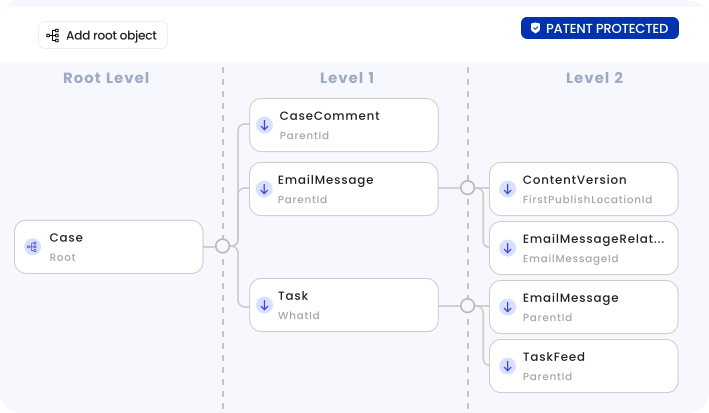
Seamless access and Salesforce integration
Effortlessly search, export, or restore archived data using Salesforce-native integration and real-time, secure viewing.
Learn more
Purge data safely
Ensure secure data removal with support for cascade deletions and handling of orphan records.
Learn more
Create tailor-made archiving policies
Design unlimited, policy-driven archiving rules while retaining data securely maintaining the utmost security standards for decades.
Learn more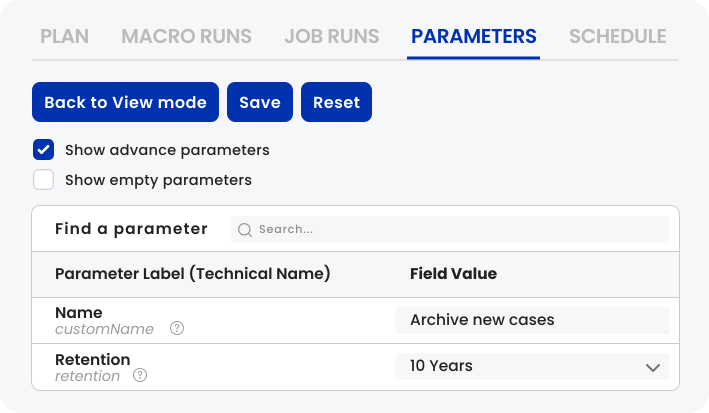
Achieve complete, coherent archives for your largest Orgs
Odaseva Archiving uses Salesforce Bulk and REST APIs for efficiency, optimizing consumption and avoiding governor limits. Our PK chunking handles massive datasets, ensuring high-speed, reliable extraction.
Learn more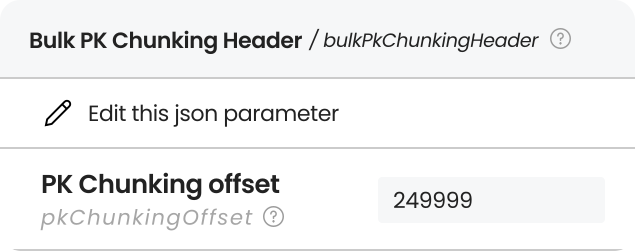
Search and preview with an indexed explorer
Leverage our interactive explorer to search indexed fields and preview or download files, while respecting all production-level user permissions.
Learn more
Unlock the Full Power of Your Data with Data Archiving for Salesforce

Unlock your deepest data with advanced JSON queries—access 30+ levels of nested information that standard queries can’t reach.
Eliminate archiving risks in complex data hierarchies with visual data management using Odaseva Archiving.
Accelerate file extraction by up to 100x using existing backups to unlock the value of your historical data faster and easier.
More Ways to Strengthen Your Salesforce Data
Managed Archiving Services
Archiving Agent
Trusted by















.png)









Real Impact, Real Customers


FAQs

Odaseva Data Archiving moves older or infrequently accessed Salesforce data into optimized, secure storage — boosting Salesforce performance while ensuring data remains accessible and compliant.
Yes. Salesforce data archived through Odaseva stays fully accessible based on user permissions, maintaining usability while optimizing active Salesforce storage.
By archiving targeted Salesforce data, Odaseva Data Archiving reduces active data volume, leading to faster Salesforce performance, a better user experience, and reduced storage costs.
Yes. Odaseva Data Archiving encrypts archived Salesforce data at rest with granular encryption, and supports customer-managed encryption keys.
Adopting best practices for archiving your Salesforce data is key, as archiving means deleting data from your production org and pushing it outside. Here is a simplified and non-exhaustive list of data archiving best practices:
- Clear Policies: Define a clear and actionable Salesforce data archiving strategy driven by retention requirements, org performance, and storage costs.
- Scoping: Target records by querying object conditions such as looking at Last Modified dates or Statuses
- Data Retention: Define your data archiving retention strategy (business and compliance driven)
- Observability: Keep track of the archived records in Odaseva Analytics
- Data Accessibility: Decide what archived data can be viewed and by whom
- Data Security: Make sure your data remains encrypted whether it is in transit, in processing, or at rest in a stored archive.
- Data Lifecycle: Design your preferred process to search for the exact data you want to unarchive or delete
Adopting best practices for archiving your Salesforce data is key, as archiving means deleting data from your production org and pushing it outside. Here is a simplified and non-exhaustive list of data archiving best practices:
- Clear Policies: Define a clear and actionable Salesforce data archiving strategy driven by retention requirements, org performance, and storage costs.
- Scoping: Target records by querying object conditions such as looking at Last Modified dates or Statuses
- Data Retention: Define your data archiving retention strategy (business and compliance driven)
- Observability: Keep track of the archived records in Odaseva Analytics
- Data Accessibility: Decide what archived data can be viewed and by whom
- Data Security: Make sure your data remains encrypted whether it is in transit, in processing, or at rest in a stored archive.
- Data Lifecycle: Design your preferred process to search for the exact data you want to unarchive or delete
Resources
READ ALL
6 Concepts to Archive Salesforce Data at Scale

How DoorDash Solved Performance Issues and Achieved Successful Backups with Odaseva
How Archiving Salesforce Data Solves 3 Big Problems
.png)


