

Salesforce Data Backup and Restore: 8 Questions Enterprises Must Answer
Do you need to backup your Salesforce data?
Yes.
If your Salesforce data is important to your organization, then you need to have a backup plan in place. And that’s not all - you must be able to restore your Salesforce data if it’s lost or corrupted.
Salesforce data backup and recovery becomes exponentially more complex at enterprise scale. Organizations managing Large Data Volumes—like DoorDash with 17 billion records or Accor Hotels with 80 million accounts—face challenges including sophisticated data models, extensive integrations, and strict compliance requirements that generic data backup solutions cannot adequately address.
Enterprises using data backup software not specifically designed for Salesforce face significant risks. According to The Enterprise Strategy Group, 73% of data loss stems from internal incidents. Without proper data backup solutions, organizations risk catastrophic consequences including business interruption, reputational damage, and regulatory fines.
Here are answers to eight important questions about backing up and restoring Salesforce data in the enterprise.
Note: This post is a general overview of what enterprise Salesforce backup and restore entails. For a more detailed guide that covers all the technical aspects of Salesforce backup and restore, get “The Complete Guide to Salesforce Backup and Restore” here.
1. Why do I need to backup my Salesforce data?
Salesforce data is business critical, especially in the enterprise. As enterprises ramp up adoption of Salesforce for critical processes, the data stored on the platform grows in volume, complexity, and importance.
Comprehensive data backup protects against multiple threats including accidental deletion, malicious attacks, integration failures, and system errors. Organizations like Australian Network on Disability rely entirely on their Salesforce data to connect people with disabilities to employment opportunities—downtime from data loss would directly impact their mission-critical operations. Implementing reliable data backup and recovery processes is the foundation of business continuity.
2. Does Salesforce backup my data for me?
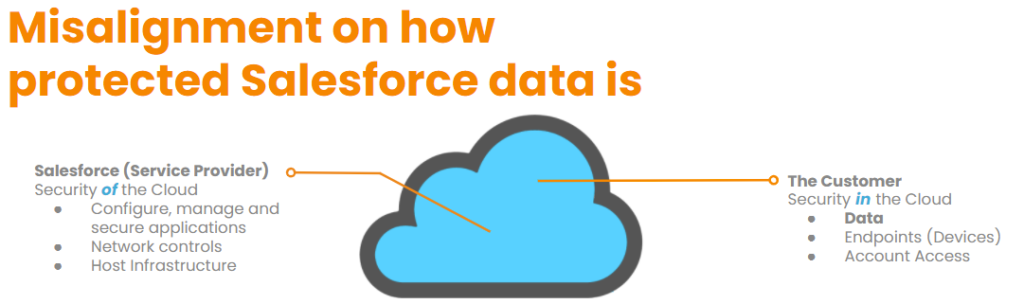
You might be asking, “doesn’t Salesforce back up my data for me?” It’s not an uncommon question. In fact, there’s a misconception that Salesforce is responsible for their customers’ data that is stored in the platform.
But Salesforce (and most other cloud providers) embrace a ‘shared responsibility model,’ which means that Salesforce is responsible for the integrity of the platform, while the customers using the platform (you) are responsible for your data that’s stored in Salesforce.
This shared responsibility model makes selecting appropriate data backup solutions critical for enterprises. Native Salesforce backup capabilities are limited—weekly exports that don't capture metadata, complex relationships, or provide granular restore options. Enterprises need specialized data backup software designed to handle Large Data Volumes while maintaining data integrity across complex object hierarchies.
3. What is Salesforce data backup and restore?
Salesforce data backup and recovery is the process of duplicating and securely storing data, metadata, and files so they can be restored to production environments when data loss or corruption occurs. Enterprise-grade data backup solutions capture complete datasets including complex object relationships, automations, and configurations.
When data incidents occur, organizations restore from backups to revert to clean data states and resume operations. For example, Accor Hotels once experienced accidental data deletion during a migration. With proper data backup services in place, they quickly reversed the problem and avoided what could have been a disruptive incident for their 1,000 call center agents.
What is Salesforce data backup?
Salesforce data backup is the process of making copies of data which is then stored in an external location.
What is Salesforce data restore?
Salesforce data restore is the process of recovering Salesforce data. To recover Salesforce data, you must first have a backup of the correct version.
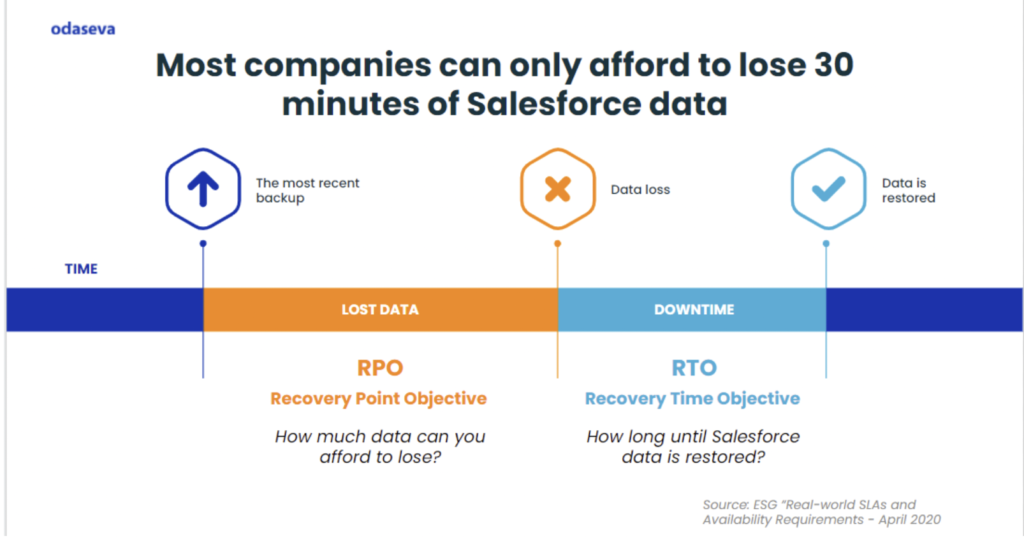
It’s important to note that there are many possible roadblocks to a successful Salesforce data restoration. Every Salesforce Org is different, with unique data models, automations, and rules. Enterprises should regularly test the restore process to ensure that data can be completely recovered within the organization’s Recovery Time Objective (RTO).
4. Why is Salesforce backup and restore important?
Data backup software protects against downtime that can halt business operations for hours, days, or even longer. With 73% of data loss stemming from internal incidents like accidental deletions or failed integrations, having reliable data backup and recovery capabilities allows organizations to restore to earlier points in time and minimize business impact.
Therefore, running a backup of Salesforce data on a regular basis helps organizations bounce back to business from data corruption or data loss events.
5. How to backup Salesforce data?
When it comes to data backup solutions for Salesforce data, there are typically three options:
- Build custom data backup software internally, which can provide a lot of control and flexibility; however, enterprise organizations are unlikely to have the expertise in-house that’s required to build a reliable, secure Salesforce backup solution that can meet their RTO and RPO objectives. And even if an organization does have the expertise, it will be difficult to justify the time and expense if a market solution already exists.
- Free or low-cost AppExchange tools, which are usually designed for simple data structures that operate with low volumes (not enterprises).
- Enterprise-grade data backup services from vendors with specific Salesforce platform expertise is the best option for enterprises, providing strong protection while enabling internal resources to focus on other projects. Organizations like Accor Hotels evaluated building custom solutions but chose specialized data backup software, noting "we don't want to develop something if there is a company that will do the job for us well."
You can learn more about the top considerations for choosing the right Salesforce backup and restore solution here.
6. What is the process for backing up Salesforce data?
There are two types of information you can backup from Salesforce: data and metadata. The first step is to determine what type of data you want to backup.
Salesforce provides four APIs to backup data and metadata information from the application:
- REST API
- SOAP API
- Bulk API
- Metadata API
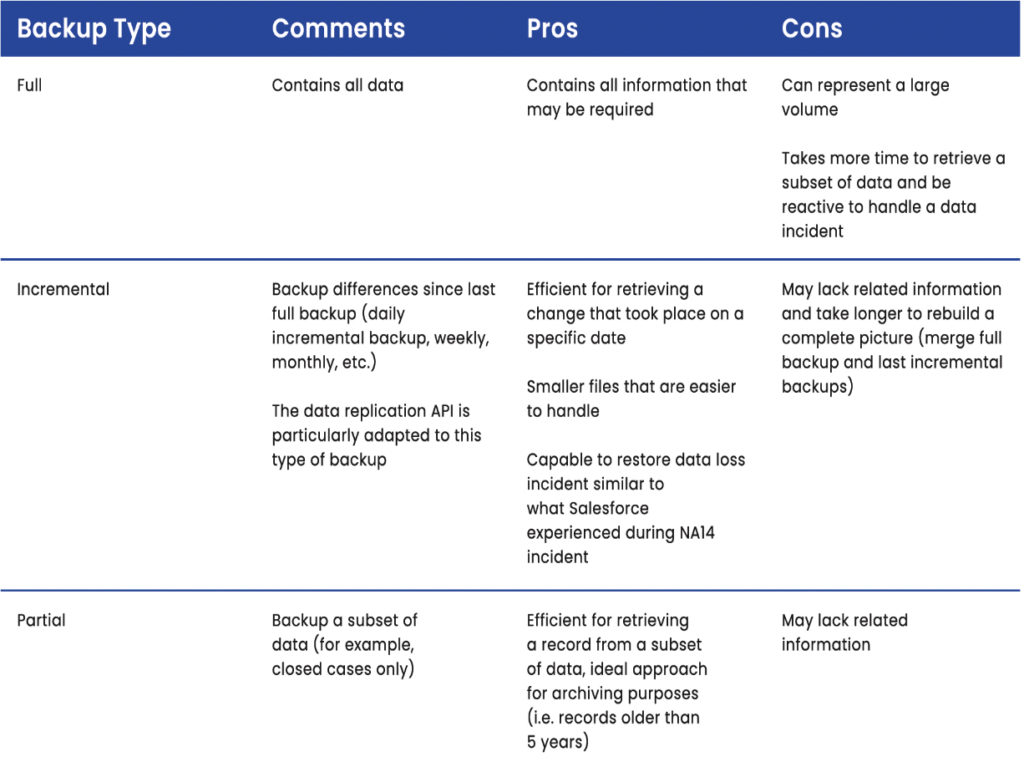
These APIs will allow you to set up either a full, incremental, or partial backup.
Let’s take a deeper look at the three types of backup.
The 3 types of backup, its pros and cons
Enterprise data backup software must efficiently leverage these APIs while respecting Salesforce governor limits. Accor backs up 2.7 TB of files and 2.1 TB of data across 2,100 objects while using only 1.32% of available BULK API calls—demonstrating how optimized data backup solutions minimize API consumption.
For more detail on APIs and the technical aspects of Salesforce backup and restore, get “The Complete Guide to Salesforce Backup and Restore” here
7. What should be included in a Salesforce backup plan?
You must ensure that you’re backing up all your important Salesforce data - not just some of it - and at the right frequency.
The following are what need to be considered when developing a Salesforce backup plan:
Risk assessment
Conduct a risk assessment for your data. Take stock of the potential risks that your Salesforce data could face: human error like accidental deletion, data theft from malicious actors, system failure from a failed update, or any other means through which it is possible to lose data. Assess how it would impact your business if one or more of these disruptions to your data were to happen. Once you know what the risks are, you’ll be better prepared to design a strategy to combat them.
Determine what Salesforce data to backup
Not all data can be treated the same. Different kinds of data have different backup requirements and it’s important to be aware of that. Some Salesforce data might not require backup, whereas mission-critical data might require the highest degree of continuous data protection. Understanding at what level to protect different kinds of data makes Salesforce data restoration and recovery more efficient and effective.
Data backup frequency
Once you know what to backup, and how, the next step is to determine the data backup frequency. Not all data needs to be backed up at the same frequency. Critical objects may need to be backed up every 15 minutes, whereas less critical ones may only need weekly backups. The risk level and the level of importance of data to your business determine the frequency of backup.
A data loss incident can happen at any time, so organizations need to be prepared to mitigate its consequences by having the most up-to-date Salesforce data to revert to.
8. What should I consider when backing up enterprise Salesforce data?
Protecting enterprise Salesforce data requires specialized data backup software designed for Salesforce complexity. Generic backup tools cannot adequately handle Salesforce-specific challenges, creating gaps that only appear during recovery attempts.
A few reasons backing up Salesforce data is complex in the enterprise are:
- Parent-child relationships: Data must be backed up in a way that allows relationships to remain intact when restored
- Large Data Volumes: Data grows and changes at a tremendous pace. Organizations like DoorDash manage 17 billion Salesforce records, requiring data backup solutions capable of processing hundreds of millions of records per hour.
- Salesforce governor limits: You can’t risk hitting limits such as API call limits, data and file storage capacity limits, etc.
- Regulatory compliance: Salesforce data, even in backups, can be subject to data privacy regulations like GDPR, CCPA, and more
- Organizational requirements: Your backup and restore / disaster recovery plan must adequately address your particular organization’s requirements like your recovery point objective (RPO), recovery time objective (RTO), the effect process automation tools have on the restore process, and more
Learn more about what enterprises need to know about Salesforce backup and restore here.
Here’s what you can do with Odaseva
Manage Large Data Volumes at maximum speed
Back up more than 300 million records per hour, run backups every 15 minutes, and back up data, metadata, and files—all while minimizing API and governor limit consumption.
Easily restore even the most complex Salesforce data
Proactively eliminate roadblocks, bypass automations, and restore parent-child relationships up to 30 levels deep. Restore even the most complex objects to any point in time.
Choose the perfect restore approach for every situation
Odaseva offers a range of options from a single record restore to rolling back an entire Salesforce object to a specific point in time.
Armor your Salesforce backups against data breaches
Odaseva Salesforce Backup & Restore offers five levels of data encryption. We’re a no-view provider, which means we can never see your data.
Use rich data analytics to restore with speed and precision
Odaseva analytics gives you a detailed view of exactly what’s happening with your data. Monitor every change, set up custom alerts, and drill into any event to launch a restore operation.
For more information and to watch a demo, visit Odaseva's Backup and Restore page here.
To learn about all the ways Odaseva can protect your Salesforce data, schedule a demo with us today.
Further reading:
- The Complete Guide to Salesforce Backup & Restore
- Three Big Risks to Your Salesforce Data (Even if You Back it up)
- Top Considerations for Choosing the Right Salesforce Backup & Restore Solution
- 10 Reasons to Choose Odaseva for Salesforce Backup and Restore
- The Need-To-Know Guide to Restoring Enterprise Salesforce Data
- Four Things Enterprises Need to Know About Salesforce Backup and Restore
View other stories
DailyExport.io: Data protection for customers of Salesforce Easy
The Salesforce for Outlook Sunset Is Closer Than You Think, Are You Ready?

Odaseva Reaches the Top of the Salesforce AppExchange Partner Program!


